
PKCasino Security Center – Complete Account Security Guide
The PKCasino Security Center helps users manage important account protection settings. It brings essential security options together in one convenient place. You can review your security status and check recent account activity. It also makes important account settings easier to access when needed. A quick security review can help keep your account information better protected.
The section includes options for passwords, personal details, and payment information. Users can update these settings whenever changes are necessary. Reviewing your login information regularly can also help identify unusual activity. Keeping security details accurate makes account management easier and more reliable. This guide explains each option and how it can help protect your account.
What Is the Security Center?
The Security Center is a dedicated area where you can review and improve your PKCasino account protection. It brings important security options together, making them easier to find and manage. You can check your current security level and review recent login information. This gives you a quick overview of how well your account is protected.
It also provides access to essential settings for passwords, payment details, and personal information. Completing these options can help reduce avoidable security risks and keep your account information organized. If you notice unfamiliar login activity or incorrect details, review your settings promptly. Taking a few minutes to check these options can make your account safer.
Account Security Level
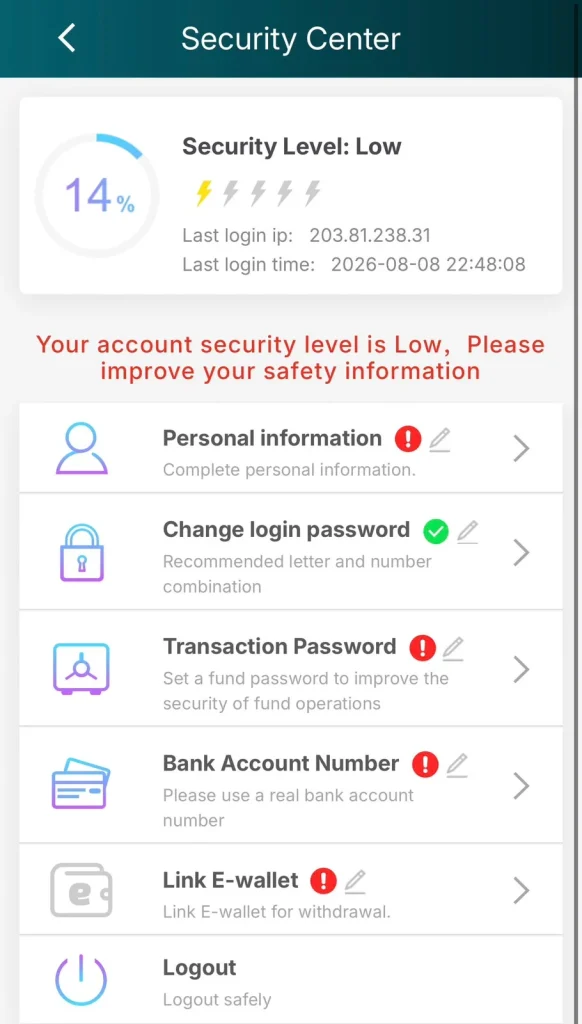
Your security level is currently Low at 14%. The page also displays your last login IP address and the exact time of your most recent login. A low level means several important security steps are still incomplete.
How to Improve Your Security Level
Complete every section that shows a red warning icon. Finish personal information, set a transaction password, add a real bank account, and link an E-wallet. Each completed step raises your overall security percentage.
Personal Information
Tap the Personal information option. Fill in all required details accurately using your real information. Saving the correct details removes the red warning and improves your security score.
Login Password
This section already shows a green check, meaning a login password is set. You can still change it anytime by entering your current password and creating a stronger one that combines letters and numbers.
Transaction Password
Open the Transaction Password section and create a separate fund password. This password is different from your login password and is required for deposits and withdrawals. Setting it adds an extra layer of protection for your money.
Bank Account Number
Select Bank Account Number and enter a genuine bank account that belongs to you. Using a real account number is important for successful withdrawals and helps raise your security level.
E-Wallet
Tap Link E-wallet and connect a supported digital wallet. Completing this step is necessary before you can withdraw winnings and also improves your overall account security.
Safe Logout
Use the Logout option at the bottom of the Security Center when you finish your session. Logging out safely is especially important on shared or public devices.
How to Secure Your Account
- Complete all incomplete sections marked with red icons
- Use strong and unique passwords for login and transactions
- Always enter real personal and banking details
- Never share your passwords with anyone
- Check your last login IP and time regularly
- Log out properly after every session
Common Security Problems
Security Level Remains Low
Finish every incomplete section one by one. The percentage only rises significantly when personal information, transaction password, bank account, and E-wallet are all completed.
Login Password Issues
If you cannot change the password, make sure you enter the current one correctly. Create a new password that includes both letters and numbers as recommended.
Transaction Password Issues
The transaction password must be different from your login password. If you forget it, use the recovery option or contact support for help.
Bank Account Issues
Only real bank accounts registered in your name are accepted. Double-check every digit before saving to avoid rejection.
E-Wallet Linking Issues
Enter the correct wallet details and complete any required verification. If linking fails, try again or switch to another supported wallet.
FAQs
Why is my security level still showing Low?
You need to complete all incomplete sections. Partial updates are not enough to raise the level significantly.
Can I use the same password for login and transactions?
No. The transaction password should be different to provide better protection for your funds.
Is it mandatory to link a bank account and E-wallet?
Yes, both are required to improve security and to enable smooth withdrawals.
What should I do if I notice an unknown login IP?
Change both your login password and transaction password immediately, then contact support if needed.
Does a higher security level give any extra benefits?
Yes. It better protects your account and is usually required before withdrawals work smoothly.
How often should I check the Security Center?
It is good practice to review it regularly, especially after logging in from a new device.